WhatsApp Pricing and Billing
Managing WhatsApp billing within HighLevel is essential for agencies and sub-accounts aiming to optimize communication costs and implement seamless rebilling processes. This article provides a comprehensive breakdown of WhatsApp’s pricing structure, subscription charges, message categories, and detailed rebilling workflows. By understanding these components, agencies can enhance billing accuracy, maximize profitability, and create efficient messaging strategies for their clients.
Overview of WhatsApp Billing
As of July 1, 2025, HighLevel will utilize a per-message pricing model for WhatsApp, shifting away from the former flat-fee per 24-hour conversation window. This transition offers increased transparency, enabling agencies and businesses to track and control messaging costs with greater precision.
WhatsApp messages are categorized into four types:
- Marketing
- Utility
- Authentication
- Service
Each category has unique pricing rules and strategic applications. Proper alignment with these categories allows businesses to capitalize on cost-saving opportunities, such as free utility messages within an open customer service window, while delivering timely, relevant communication.
WhatsApp Subscription Charges for Agencies
- Monthly Subscription: Each sub-account that uses WhatsApp is billed $10USD per month to the agency.
- Rebilling Opportunity: Agencies can rebill clients at a custom rate (default: $29.99 per location/month), creating a built-in profit margin.
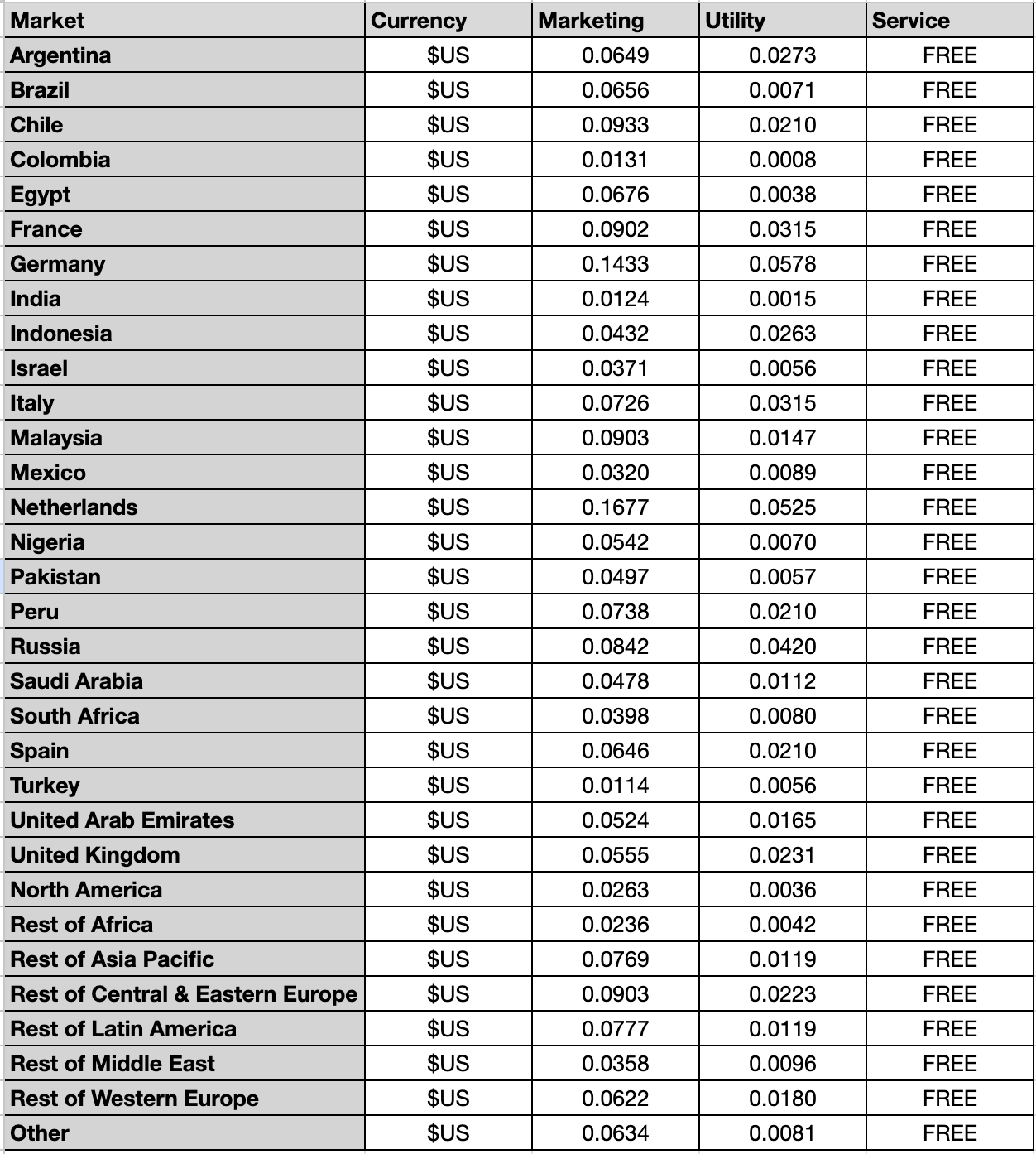
WhatsApp Messaging Rates
- Template Categories: Rates vary by message type—Marketing, Utility, or Authentication—and by destination region.
- Payment Processing Fees: A 5% Stripe fee is applied to each charge.
- Regional Pricing: Message rates differ based on the recipient’s country.
Conversation Categories
Marketing
- Goals: Generate awareness, drive sales, and retarget customers.
- Examples: Product announcements, promotions, and cart abandonment reminders.
Utility
- Goals: Respond to user actions or requests.
- Examples: Delivery updates, payment reminders, and surveys.
Free if sent within an open customer service window.
Authentication
- Goals: Authenticate users with one-time passcodes.
Service
- Goals: Resolve customer inquiries.
- Examples: Customer support interactions via free-form messages.
Opening Conversations
- Marketing, Utility, and Authentication Conversations: Opened when an approved template message is sent to a customer with no active conversation of the same category.
- Service Conversations: Opened when a free-form message is delivered to a customer with no other active conversations. A 24-hour period starts when a customer messages you, allowing free-form messages to be exchanged.
📌Note: All message types, except template messages, can only be sent to a user during an active customer service window. Template messages, however, may be sent at any time, provided the user has opted in to receive messages from you.
Free Entry Point Conversations
When a customer contacts you via a Click-to-WhatsApp Ad or Facebook Page Call-to-Action, a free entry point conversation is opened. These conversations last for 72 hours and allow for unlimited messaging without additional charges. All message types can be sent without incurring additional charges during this period.
Rebilling WhatsApp Messages
Rebilling enables agencies to set custom pricing for their clients, creating scalable revenue streams.
How It Works
Agencies pay fixed rates per message by category and region. A pricing multiplier can then be applied to calculate client-facing rates. By default, the multiplier is set to 1.05x to cover payment processing fees, but this setting can be adjusted.
To set up WhatsApp rebilling, navigate to the Settings tab from the Agency View.
Select Billing and locate WhatsApp billing options.
Enter your payment details, select the appropriate subscription plan, and enable rebilling with your custom pricing.
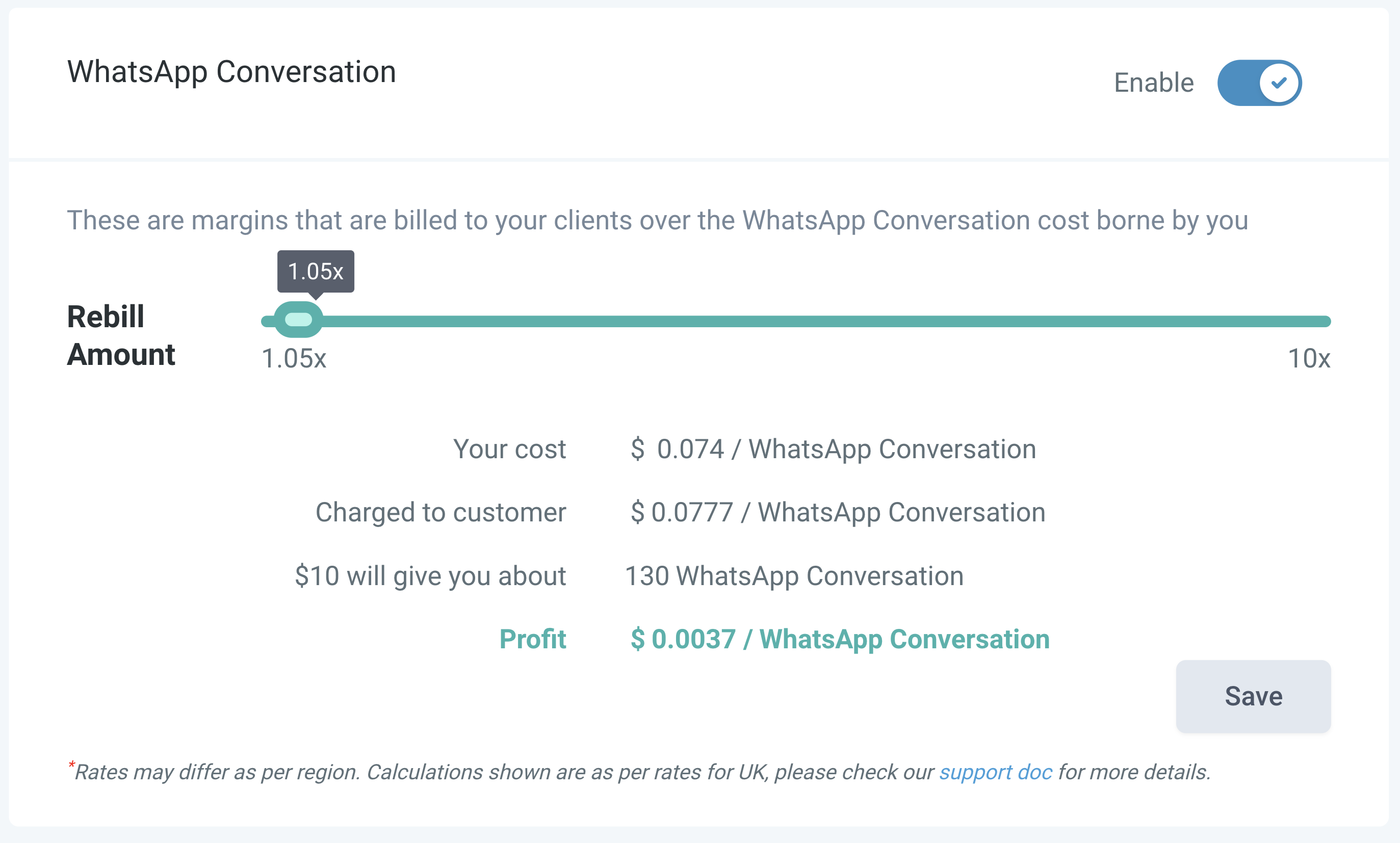
Review and verify all billing configurations.
WhatsApp Subscriptions
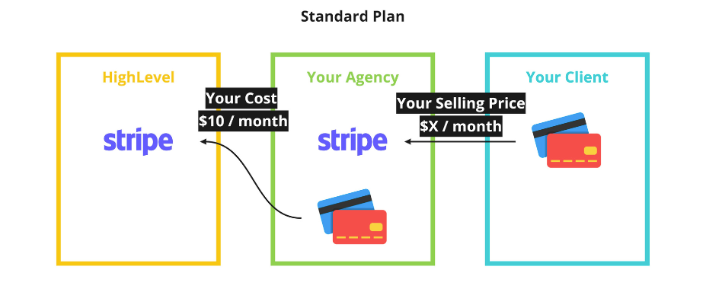
When a client subscribes:
Two Stripe subscriptions are created:
- Client → Agency: Client pays the agency for WhatsApp services.
- Agency → HighLevel: Agency pays HighLevel $10/month per location.
By understanding how message categories, entry points, subscription charges, and regional rates interact, agencies can create profitable, transparent billing workflows while maintaining meaningful, timely communication with customers. With careful setup and smart usage, WhatsApp can become a high-impact, cost-efficient channel for customer engagement.
Frequently Asked Questions
Q: How are conversations opened?
- Marketing, Utility, Authentication: Opened via template messages.
- Service: Opened via free-form messages.
Q: Can multiple conversations be open with the same customer?
- A: Yes, different category conversations can run simultaneously.
Q: What is a customer service window?
- A 24-hour timer that starts when a customer sends you a message. During this time, you can send free-form or utility messages without extra charges.
Q: What happens if I send templates from different categories within the same 24-hour window
- Each new category opens a separate conversation and incurs additional charges.