Do Not Disturb
DND is also known as “Do Not Disturb”. It allows you to remove a contact from one or all communication channels integrated with the CRM. The DND feature is crucial for maintaining compliance and respecting the communication preferences of your contacts.
Here’s a breakdown of how it works:
- All Channels DND: This setting prevents any form of communication from being sent to the contact.
- Channel-Specific DND: Allows you to specify which channels should be restricted, enabling communication through the others.
For instance, a contact might prefer emails over text messages or calls. You can adjust their DND settings accordingly to respect their preferences.
Once integrated with the system, DND can be configured for each channel (such as Calls, Emails, Facebook, GMB, SMS, and WhatsApp).
Automated Compliance Features
The CRM includes automated settings to maintain both SMS and Email compliance:
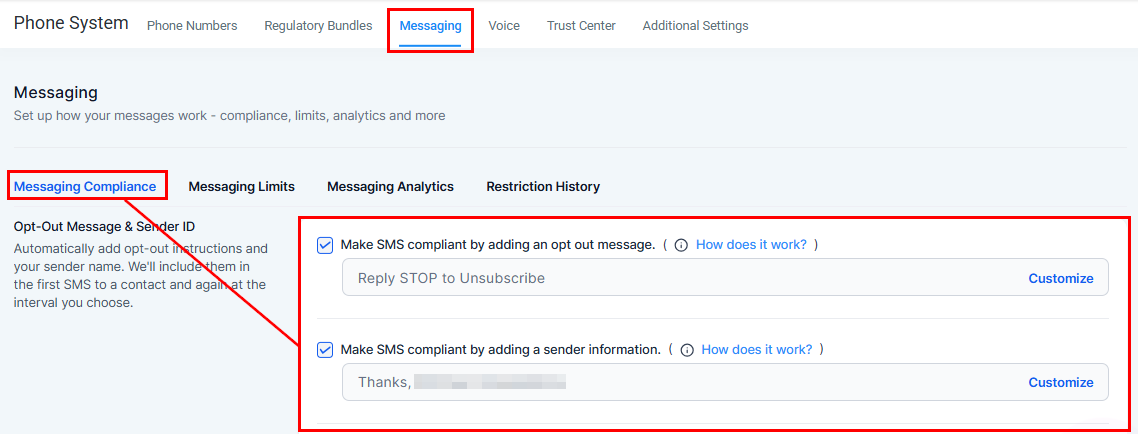
For SMS Compliance, you can enable;
- Opt-Out Messages: An automatic message is added to SMS communications, allowing recipients to reply “STOP” to unsubscribe. This updates their Do Not Disturb (DND) settings accordingly.
- Sender Information: You can configure SMS messages to include sender details for transparency.
To customize these settings, navigate to the General Settings > Phone System > Messaging > Messaging Compliance to configure these messages.
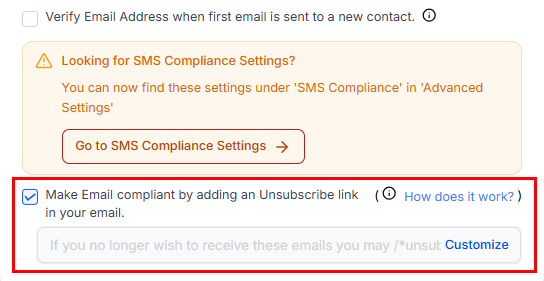
For Email Compliance, which works similarly to SMS compliance, an unsubscribe option is automatically included in your emails. When a recipient clicks this link, it updates the contact’s Do Not Disturb (DND) settings for email communication. To customize these settings, go to General Settings > Business Profile and scroll down to the General section.
DND Statuses
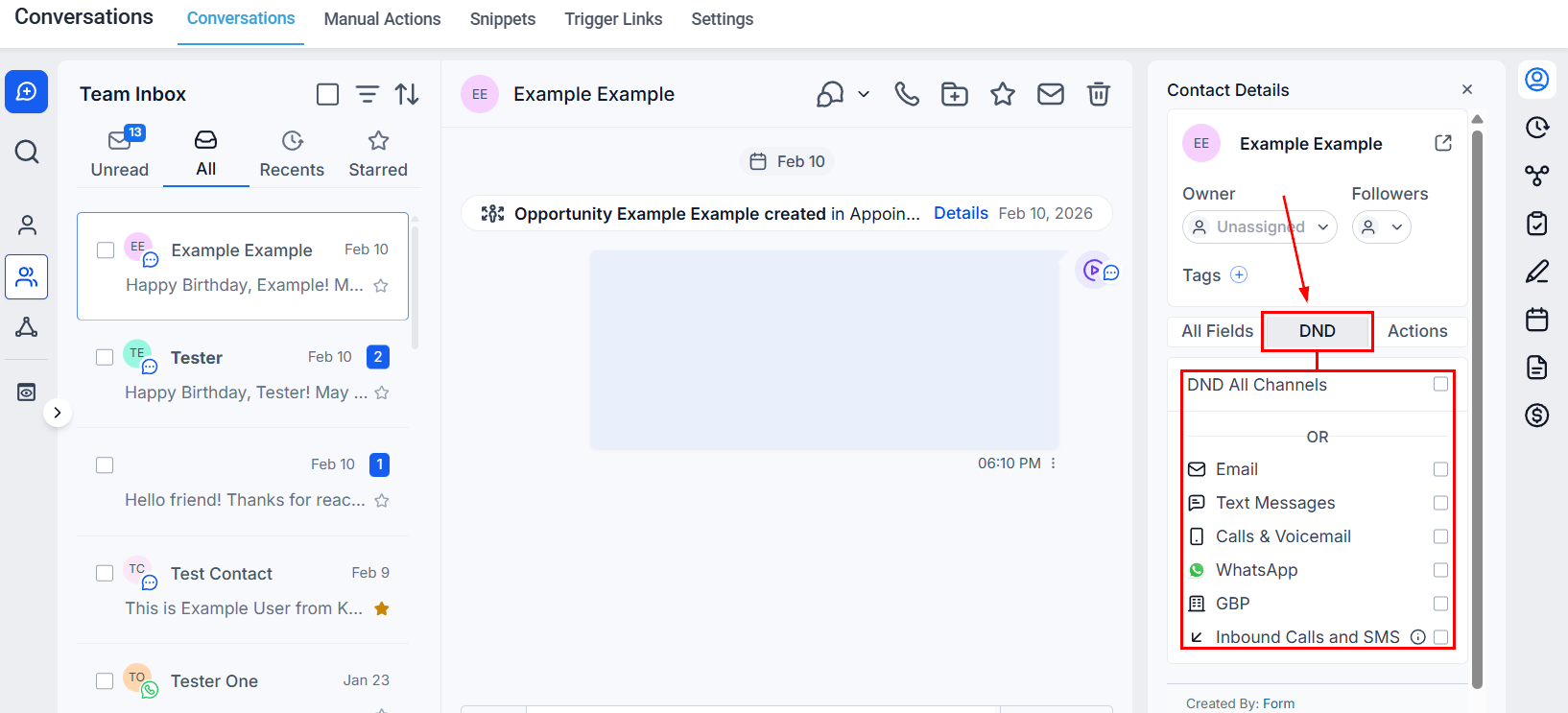
DND Statuses are displayed within the Conversations tab to help manage the communication preferences of each contact.
- DND “On”: Indicates that neither automatic nor manual outgoing messages are allowed to be sent.
- DND “Off”: All automated and manual messages function normally.
The integrations (Calls, Voicemails, Emails, Facebook Messenger, GMP, SMS, and WhatsApp) appear as channels that users can individually enable or disable. If an integration is disconnected, each contact retains its previous DND status upon reconnection. For instance, if a contact is set to DND for Facebook Messenger, it will remain DND when reconnected.
DND for Email
The system will Auto-Enable DND for a contact’s email if the criteria below are met:
- ISP email permanent failures such as bounce, generic, suppress-complaint, suppress-unsubscribe, and suppress-bounce. (Understanding Mailgun Suppressions)
- When a recipient unsubscribes or marks the email as SPAM (Mailgun complaint event).
📌 Note: Users can disable DND from the contact record for the reasons above, except when marked as SPAM.
Remove Email DND for a Contact
If a user is marked as DND due to bounce or suppression events, remove the contact’s email from the suppression list with your ISP, validate the email, and then re-enable it in the system.
DND for SMS
Two types of SMS DND can be applied to a contact:
- Temporary- If messages return a 30003, 30005, or 30006 error.
- Permanent- If messages return a 30004 error or the contact responds with an Opt-Out keyword such as STOP, UNSUBSCRIBE, or CANCEL.
Contacts with a temporary SMS DND can be updated from within the contact record; however, contacts with a permanent SMS DND are required to text “START” to deactivate the DND.
Inbound DND
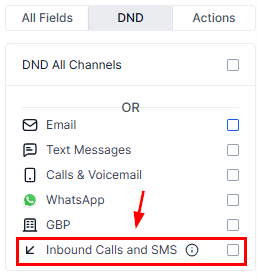
The DND Inbound Calls and SMS feature allows users to prevent specific contacts from calling or texting the CRM number. When enabled, this feature ensures that any inbound calls or SMS messages from the marked contacts are blocked, reducing unwanted communication.
Workflow Integration
The CRM allows you to integrate DND settings into your workflows. For example, if a contact unsubscribes from your emails, you can automatically update their DND settings to reflect this preference. This ensures that your workflows respect the contact’s communication preferences, enhancing their experience with your brand.
Frequently Asked Questions
Q: What happens if a contact is in a workflow and then opts for DND?
- A: The CRM intelligently skips the communication steps that the contact has opted out of, ensuring compliance without removing them from the workflow entirely.
Q: Can I remove a contact from all workflows if they opt for DND on all channels?
- A: Yes, you can use the workflow options to remove a contact from all workflows if they no longer wish to be contacted in any form.
Not a Funnelbud customer yet?
Try our all-in-one CRM for sales and marketing — free for 7 days, no commitment.