How to create voicemail drop automation
Voicemail is an effective way to communicate with your leads and customers and quickly share information about your business with a personal touch. It’s also a good alternative to sending email autoresponders.
How does voicemail drop work?
- You can use any trigger (for example, when a lead fills out a contact form).
- You need to add a Call action. The Call action will attempt to connect the lead and you, or whoever is assigned as the lead owner. If no lead owner is assigned, the call will go to the default forwarding number.
- In the Call action, you can add a “call whisper” to let you know what the call is for. Your call whisper can be “You have a new lead. Accept the call to connect or ignore it and let it go to voicemail”. Make sure to turn on Disable Voicemail Detection so the call will automatically go to voicemail.
- Then you need to add a Voicemail action and upload a voicemail recording.
- The voicemail recording will play when the system fails to connect you with the lead.
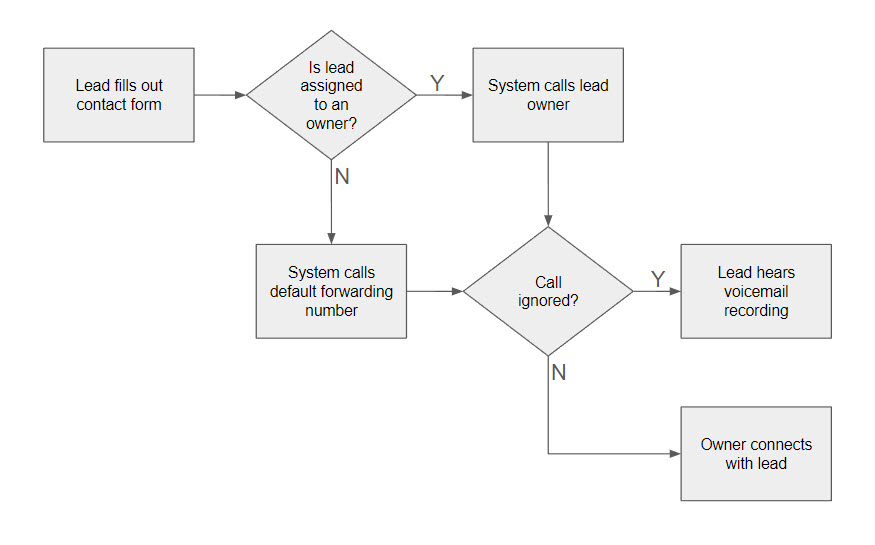 How voicemail drop works illustration
FAQ
My voicemail recording doesn’t play.
It could be because your voicemail file is not supported or is too big.
- Go to https://online-audio-converter.com/ and upload the voicemail file. Otherwise, you can create a new file here https://www.rev.com/onlinevoicerecorder.
- Select 64kbps MP3, the lower the better.
- Go back to the workflow and upload the file.
Another reason is if you didn’t add a Call action before the Voicemail action.
It works like a regular voicemail. The Call action is required to connect the lead and you. If the call fails, the voicemail recording will play.
Not a Funnelbud customer yet?
Try our all-in-one CRM for sales and marketing — free for 7 days, no commitment.