How to CC and BBC for Email Composer
When sending emails, there may be times when you need more people than just the primary contact to receive the communication. That’s where CC and BCC come in. CC (Carbon Copy) and BCC (Blind Carbon Copy) allow you to include additional recipients. When using the CC field, everyone can see each other’s email addresses. If you want to keep additional recipients private, use the BCC field instead.
When to Use CC and BCC?
- Customer Communication: If you’re talking to a customer but need help from your manager or another team, CC them to keep everyone informed.
- Confidential Stuff: If you want to keep a manager in the loop about a customer’s situation but want to keep their email from the client, use BCC.
- Mass Email: If you want to send an email to many people, like a school announcement, but you don’t want everyone to see each other’s email addresses, use BCC.
- Vendor Chat: If your business deals with different companies, and you need to talk to all of them, put the main company in “To” and CC the others. This way, they all know who’s talking to you.
How to Use CC and BCC?
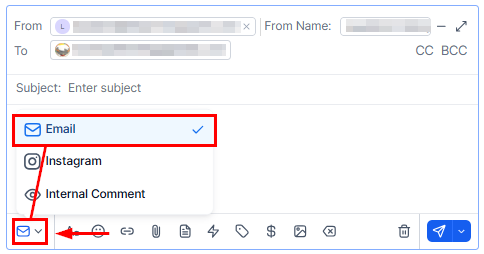
Go to the contact where you’d like to be the main recipient and click on the email channel.
Look for the CC and BCC boxes next to the “To” box. They’re easy to spot.
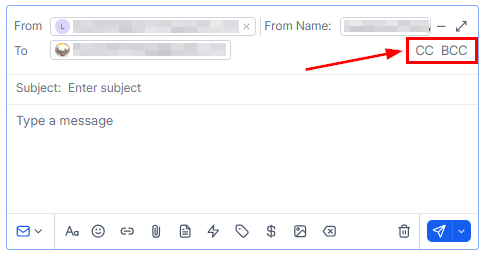
Click CC or BCC to open them. Now, you can type in the email addresses of the people you want to add. You can also choose from your contacts.
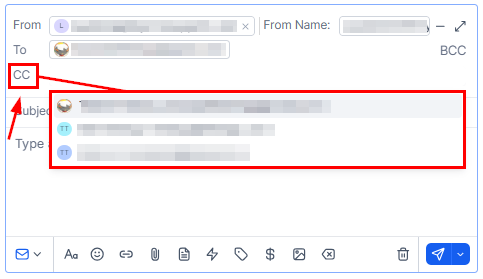
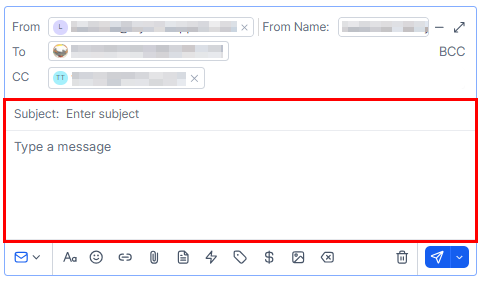
After adding all recipients, click the message box to enter a subject and compose your message. To include additional contacts in CC or BCC, click the respective field and either enter their email address or select a contact from the dropdown list.
Now that you understand how to use CC and BCC, you can easily include additional recipients in your emails while keeping certain details private when necessary. These tools help you share information effectively and maintain professionalism in your communications.
Not a Funnelbud customer yet?
Try our all-in-one CRM for sales and marketing — free for 7 days, no commitment.