Connecting Bluesky (Social Posting)
Bluesky is a decentralized social network for sharing text, images, and videos. With the Social Planner, you can connect your Bluesky account and manage content seamlessly—without leaving the platform. Once authenticated using an app password, you can create, schedule, and track Bluesky posts from the same unified calendar you use for Facebook, Instagram, LinkedIn, Google Business Profile, TikTok, and more.
Key Benefits of Bluesky Integration
- Eliminate context-switching: Plan, draft, and publish Bluesky posts alongside other channels directly within Social Planner.
- Streamline approvals: Submit Bluesky content through your team’s established review and approval workflows.
- Publish with confidence: Create posts that conform to Bluesky’s specifications to avoid failed uploads.
- Maintain consistency: Schedule posts in batches to keep your Bluesky profile active, even during busy periods.
- Reduce tool overhead: Eliminate the need for separate Bluesky tools—manage everything within the platform to save time and reduce costs.
How to Create an App Password in Bluesky
Log in to your Bluesky account, then navigate to Settings > Privacy & Security > App Passwords.
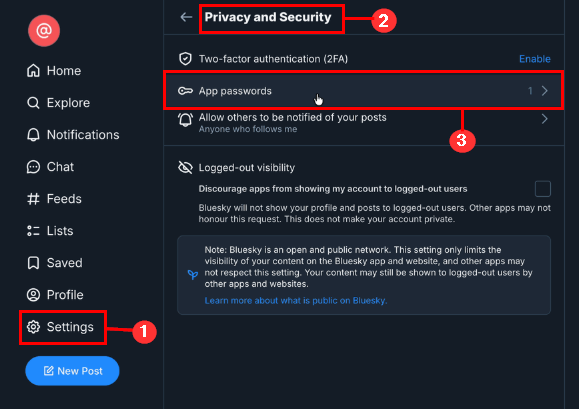
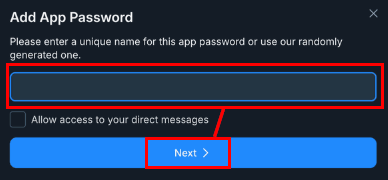
Click + Add App Password, then name your app password and click Next.
Be sure to copy the app password immediately—you’ll need it during setup.
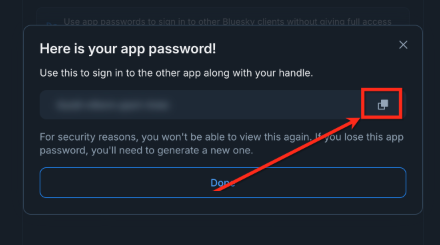
📌Note: App passwords are displayed only once. If missed, you’ll need to delete and regenerate.
How to Connect Bluesky
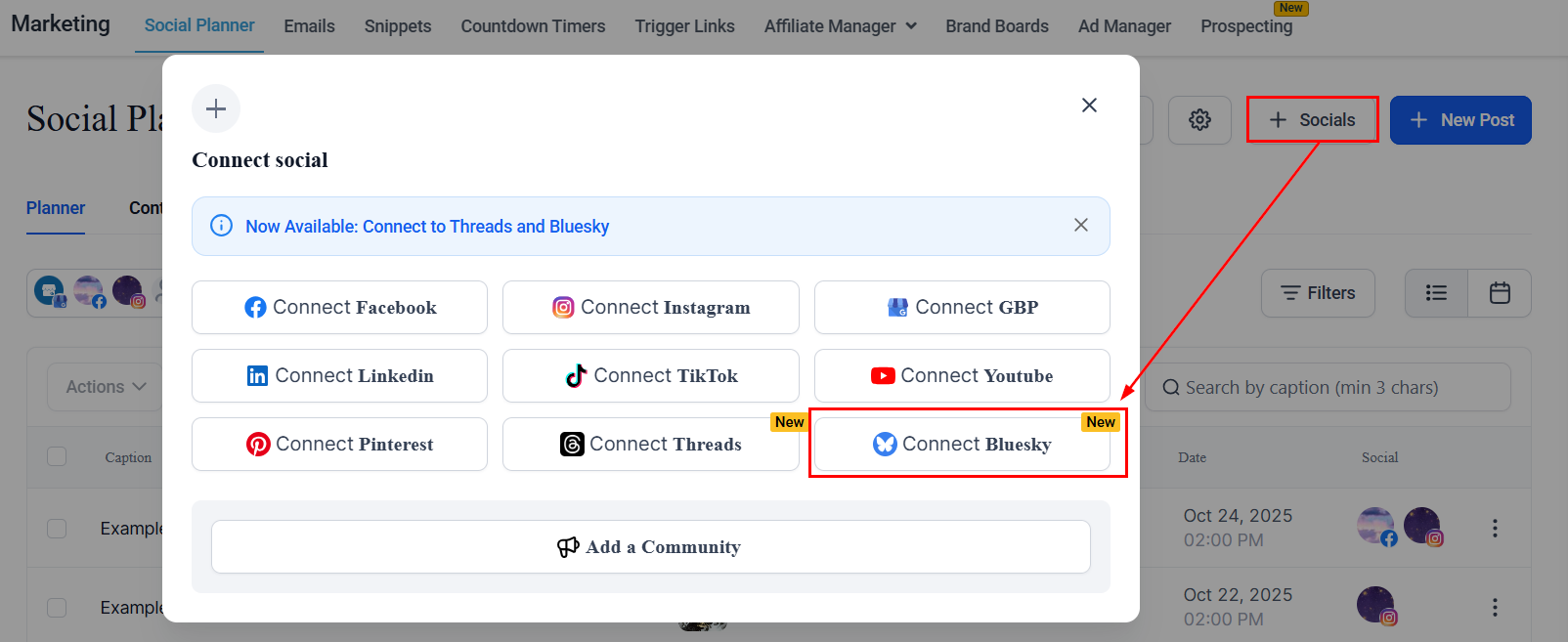
From your account dashboard, navigate to the Marketing tab and select Social Planner. Click the + Socials button, then choose Connect Bluesky from the available options.
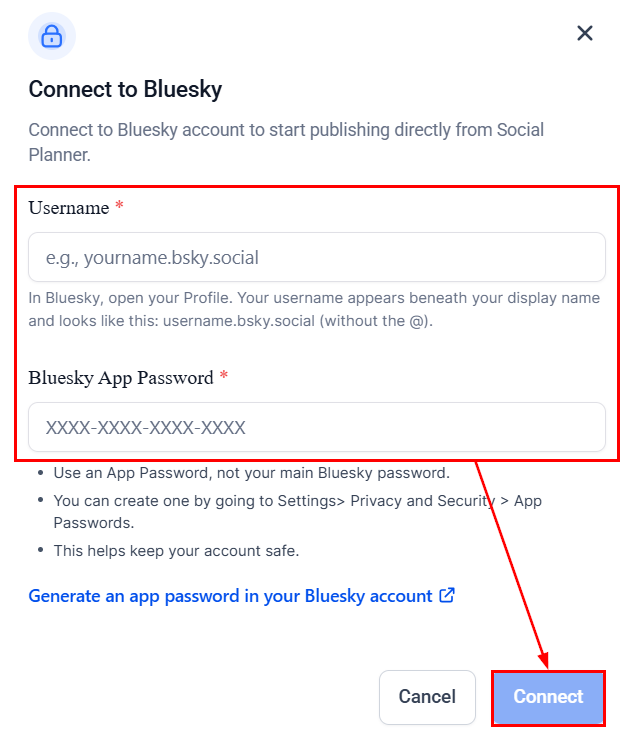
Enter your Bluesky username (excluding the “@” symbol), for example: username.bsky.social. Then, paste the app password you generated.
Click Connect to complete the integration.
Click Add next to your profile to complete the connection.
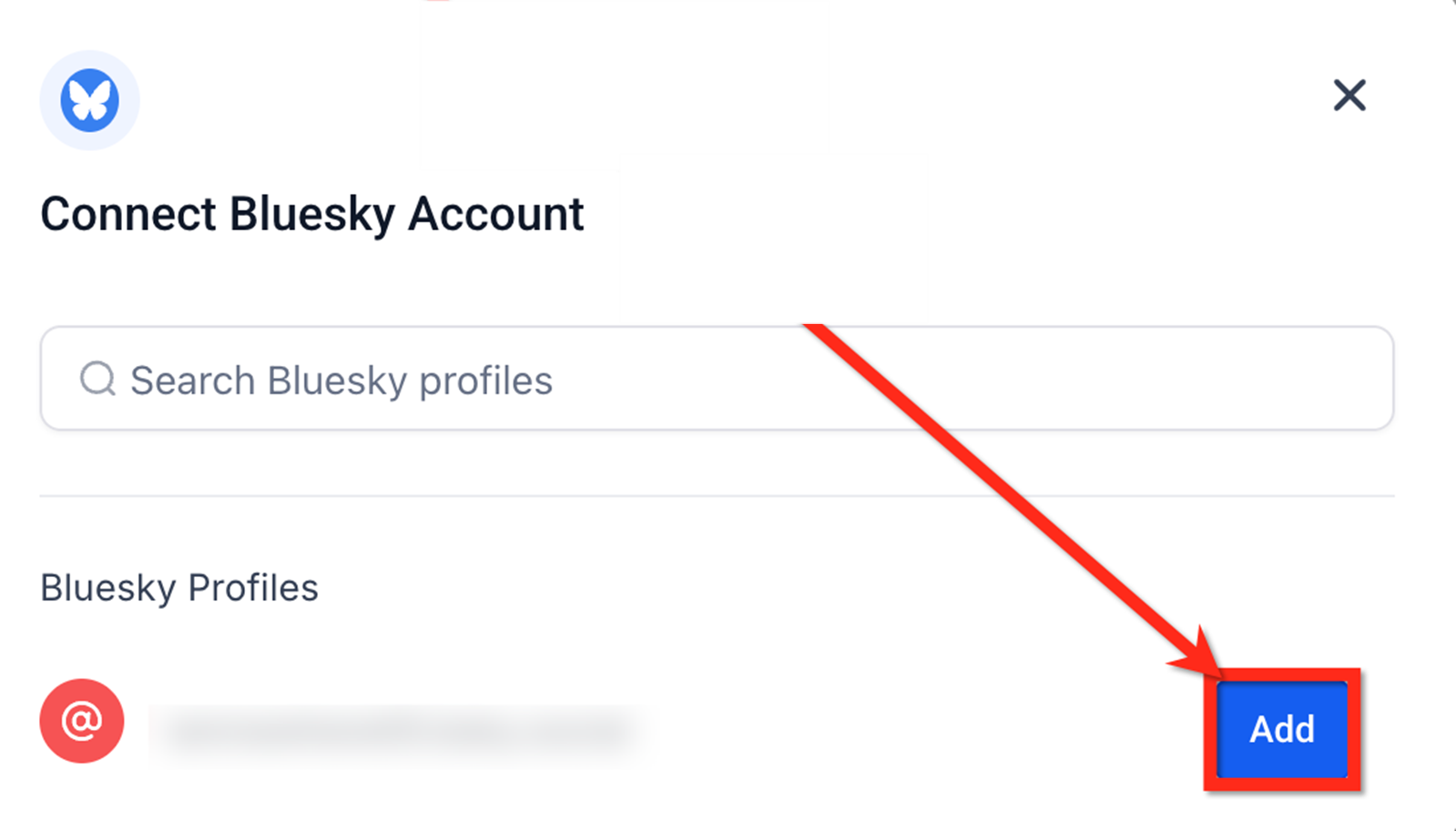
Once added, your Bluesky account will appear under the All Accounts dropdown in Social Planner.
Integrating Bluesky with the Social Planner empowers you to centralize content management across all major platforms—including emerging networks like Bluesky. With support for scheduling, approvals, and post tracking, your team can stay efficient and consistent without the need for additional tools.
Bluesky Publishing Specifications
Category | Images | Video |
|---|---|---|
File Types | JPEG, PNG | MP4, MOV |
Max File Size | 1 MB | 50 MB |
Max Uploads per Post | Up to 4 images | 1 video (images and video cannot be mixed) |
Dimensions / Resolution | Standard web resolution | Recommended: 480p–720p |
Aspect Ratio | – | 16:9 or 1:1 |
Duration | – | Up to 3 minutes |
Frame Rate | – | 30–60 FPS |
Codecs | – | H.264 (video), AAC (audio) |
Other Notes | – | No custom thumbnails |
Posting Guidelines
- Tagging/Mentions: Use the full handle (e.g., @name.bsky.social). Type carefully or copy/paste.
- Hashtags: Use standard #hashtag format. Letters, numbers, and underscores are allowed, but hashtags cannot be numbers only.
- Character Limit: 300 characters per post.
- Emojis: Supported.
- Links: Must begin with http:// or https://. Links count as 23 characters regardless of their actual length. The use of link shorteners is discouraged.
- Daily Posting Limit: 100 posts per 24-hour period.
Frequently Asked Questions
Q: Why do I need an app password instead of my regular Bluesky login?
- A: For security reasons. App passwords protect your main login credentials and are required for third-party integrations like Social Planner.
Q: What if I lose the app password?
- A: Go to Bluesky, delete the existing app password, create a new one, and reconnect the account in Social Planner.
Q: What happens if the app password expires?
- A: Generate a new app password in Bluesky and reconnect your account.
Q: Can I connect multiple Bluesky accounts?
- A: Yes. Each account must be connected separately using its own unique app password.
Q: Do I need to reconnect if I log out of Bluesky?
- A: No. Once connected via an app password, your account remains connected unless the password is reset or removed.
Not a Funnelbud customer yet?
Try our all-in-one CRM for sales and marketing — free for 7 days, no commitment.