How to Block Spam Calls & Identify Unknown Callers
Spam calls, invalid numbers, and unknown callers can make your process less efficient and result in wasted resources that could be better utilized elsewhere. The Number Intelligence is a bundle of functions that clarify details, helping you avoid those issues altogether.
To access it, navigate to the Additional Settings tab inside the Phone Number section of your tabs and select the Number Intelligence tab.
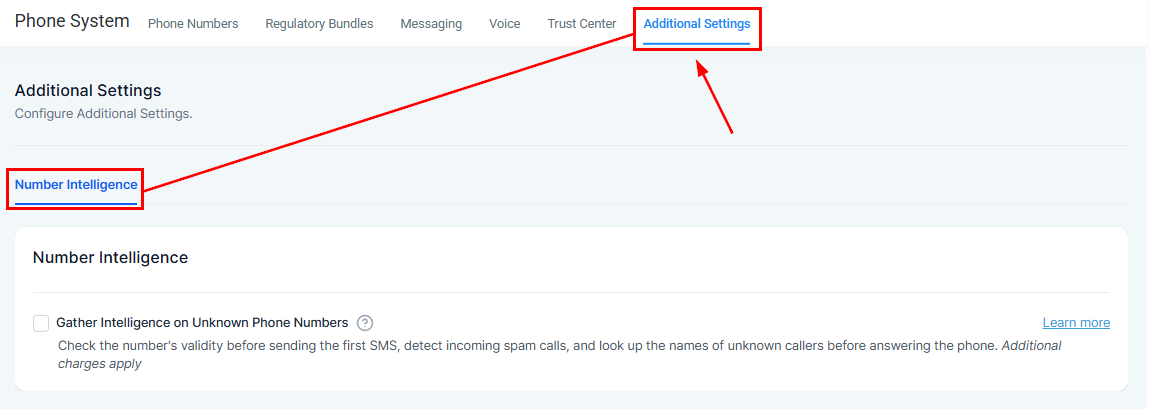
Check the box next to Gather Intelligence on Unknown Phone Numbers.

Enabling this option will start three functions:
- Filter Spam Calls: Automatically flags spam calls from unknown U.S. numbers, helping you avoid interruptions.
- Identify Unknown Callers: Fetch the names of unknown callers for personalized greetings.
- Validate Numbers Before SMS: Continuously checking if numbers are SMS-incapable before sending.
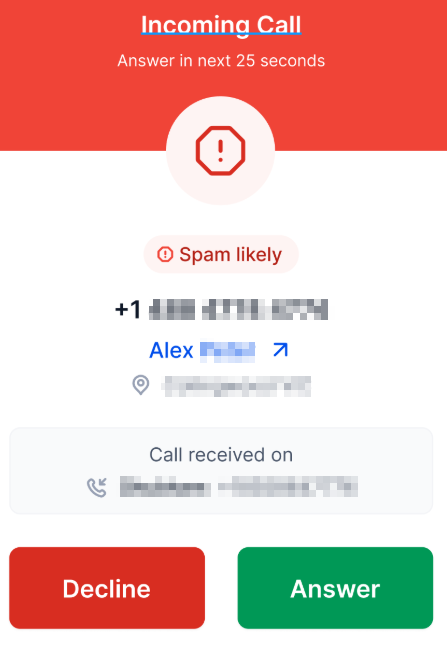
Which will look like this when receiving calls.
To opt out, click the box to uncheck Gather Intelligence on Unknown Phone Numbers. When disabled, spam calls, name lookups, and SMS validations will no longer be performed.

This allows you to spend more time connecting with valuable leads and growing your business instead of wasting it on spam calls and unviable numbers.
Frequently Asked Questions
Q: Can I customize which features of Number Intelligence are enabled?
- A: As of Dec 5th, 2024, all three features (Spam Detection, Name Lookup, and Number Validation) are activated or deactivated together.
Q: Does this feature work outside the USA?
- A: Spam detection and name lookup currently apply only to calls from phone numbers in the USA. The location of the sub-account or their phone number does not matter. SMS validation works worldwide.
Q: How does the system handle spam calls?
- A: Spam calls are flagged as “Spam Likely” and can still appear in call logs and conversations. You can later add these numbers to an inbound DND list for further blocking.
Not a Funnelbud customer yet?
Try our all-in-one CRM for sales and marketing — free for 7 days, no commitment.