How To Integrate Network Merchants Inc. (NMI)
NMI (Network Merchants Inc.) is a well-known payment service provider that offers a variety of solutions for businesses to process online transactions securely and efficiently. NMI’s payment gateway allows merchants to accept credit card and eCheck payments from their customers through multiple channels, including websites, mobile apps, and in-person point-of-sale systems.
How Can I Enable Payments Via NMI?
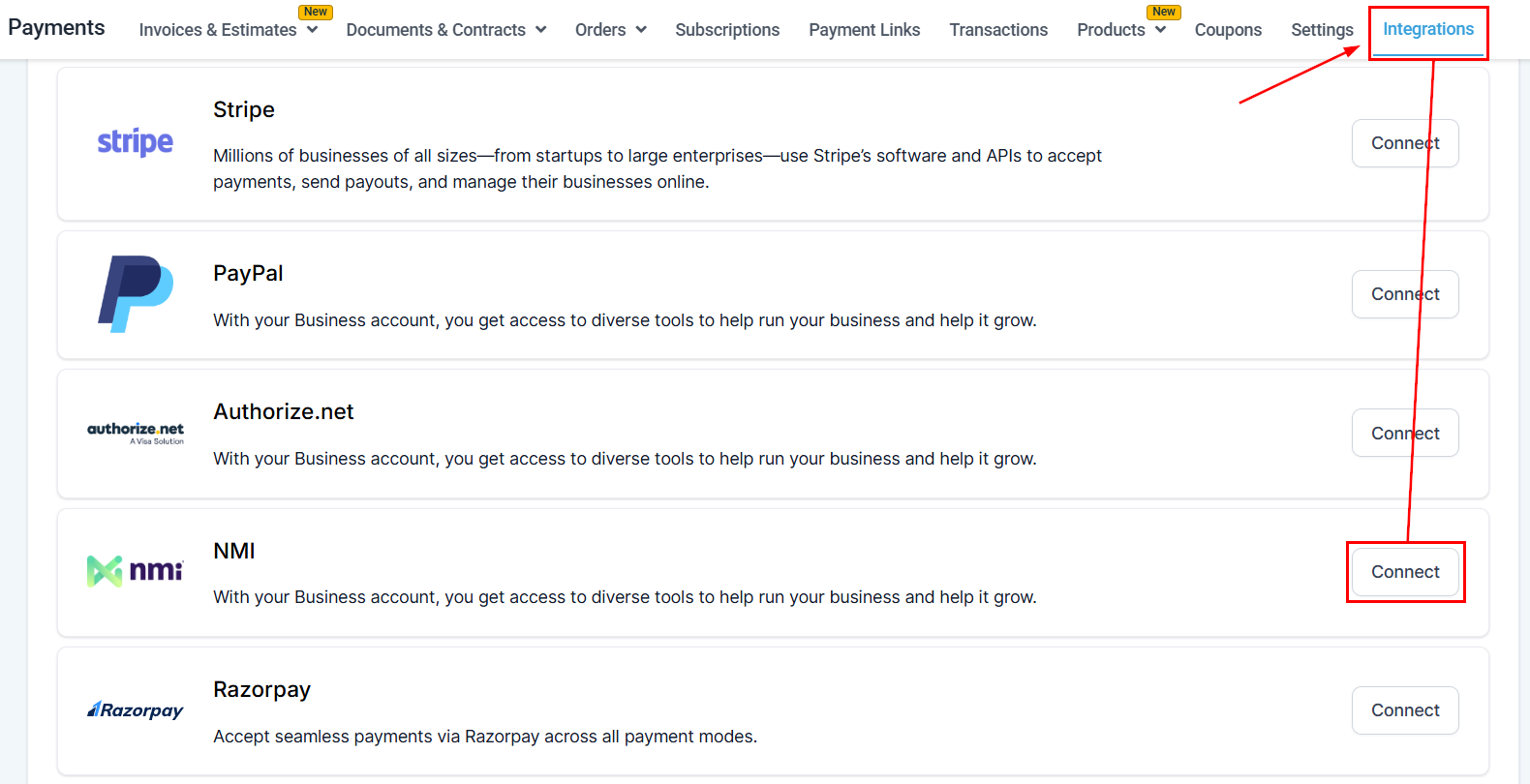
NMI integration is currently supported for order forms, invoices, and Text2Pay link payments. To enable NMI in your CRM, head to the Integrations tab in the Payments section, scroll down to find the NMI option, and click Connect.
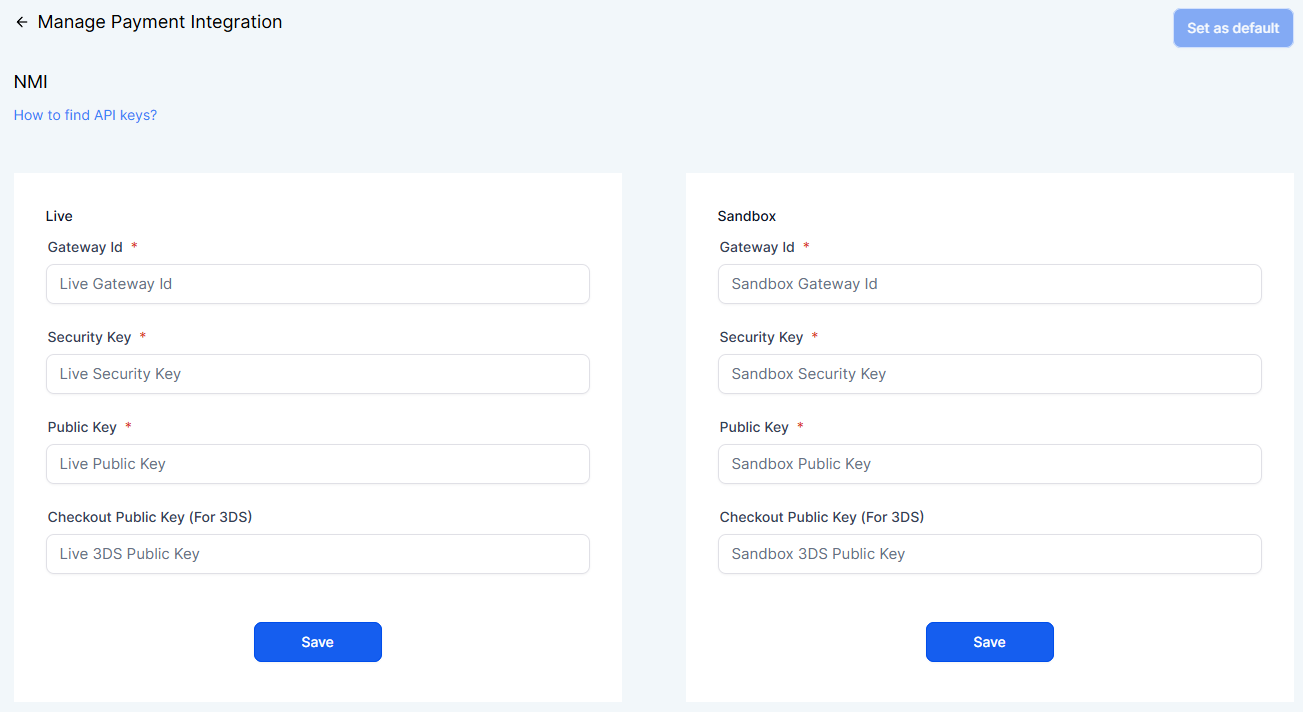
Fill in the required Gateway ID, Security Key, and Public Key for both the Live and Sandbox sections, then click “Save” to apply your NMI integration settings.
NMI Payment Offers
Some of the features offered by the NMI payment gateway include the following:
- Support for multiple currencies and payment methods: NMI supports various currencies and payment methods, allowing businesses to cater to a global audience.
- Tokenization and encryption: NMI’s platform uses tokenization and encryption technologies to ensure that sensitive cardholder information is securely transmitted and stored, minimizing the risk of fraud and data breaches.
- Fraud prevention tools: NMI offers various fraud prevention tools, such as Address Verification System (AVS) and Card Verification Value (CVV), to help merchants identify and block potentially fraudulent transactions.
- Customizable checkout experience: Merchants can customize the look and feel of their checkout process to match their branding, ensuring a seamless customer experience.
- Recurring billing and subscription management: NMI supports recurring billing and subscription management, making it easy for businesses to offer subscription-based products or services.
- Integration options: NMI offers a range of integration options, including APIs and pre-built plugins, making it easy to connect the payment gateway to various e-commerce platforms, shopping carts, and other third-party software.
- Reporting and analytics: NMI’s platform provides comprehensive reporting and analytics tools that allow merchants to track and analyze transaction data, helping them make informed business decisions.
- Customer vault: Merchants can securely store their customers’ payment information in NMI’s customer vault, simplifying the checkout process for returning customers and making it easy to manage recurring payments.
FAQs
Q: Will I be required to create new products for using the integration? How should I sync the products with my payment provider?
- A: Syncing the products is not required at all for using NMI/Authorize.net integration. You are only required to create a product(one-time/recurring) under Payments ➝ Products, and it will work according to the price defined while creating/editing the product. If existing products are being used with Stripe/Paypal, they will work with Authorize.net or NMI by switching the default provider under Payments ➝ Integrations. No additional sync is required to be done in that case.
Q: What payment methods are supported using NMI? Are Apple Pay, Google Pay, and e-check payment methods supported?
- A: Only credit/debit card payments can be accepted using NMI integration. You cannot accept Apple Pay, Google Pay, or check payment methods.
Q: Will recurring purchases be supported with NMI? Where can I find the track of subscriptions and orders placed?
- A: Yes, recurring product purchases are supported using NMI integration. You can track the subscriptions under Payments ➝ Subscriptions and orders details under the Orders and Transactions table.
Q: I am already using Stripe. Do I need to disconnect Stripe to connect to NMI?
- A: No, you are not required to disconnect Stripe to connect to NMI. You can connect to both gateways on the integrations page. However, since you have connected two gateways for processing payments, you must define a default gateway for processing order form payments.
Q: Why don’t I see PayPal among the default gateway options?
- A: You can connect to Paypal and use it as a payment method alongside a credit card payment method using Stripe/Authorize.net/NMI. This means that the default must be chosen among Stripe/Authorize.net/NMI when connected. PayPal can be used independently and alongside credit card payment methods on order forms.
Q: I have connected to NMI and have selected it as the default gateway. Will transactions across the application be processed through NMI now?
- A: The NMI integration is available only for invoices, text2pay links, and order form payments. This means that if NMI is connected and is set as the default gateway, only these payments will be processed through NMI. Other payment areas like calendars, SaaS, or memberships will continue to process payments using Stripe.
📌NOTE: If there are any recurring subscriptions/pending transactions with Stripe, they will continue to run as is till the time the Stripe connection is in place. We encourage you to keep the connections in place and not disconnect any gateway, defining the default gateway will run new transactions through the desired choice and will keep in place the existing subscriptions running through Stripe and/ or PayPal.
Q: What will change in the reporting of transactions done with Authorize.net? Where will I be able to keep track of all payments?
- A: There will be no change in the Orders/Subscriptions/Transactions reporting. All the payments done via NMI/Authorize.net will be available under Payments ➝ Transactions.
- Also, there will be no change in the functioning of triggers/attribution associated with order forms. All the functionalities will work the same.
- How do I Cancel/End a subscription created via NMI/Authorize.net? I am not able to do so in the merchant portal.
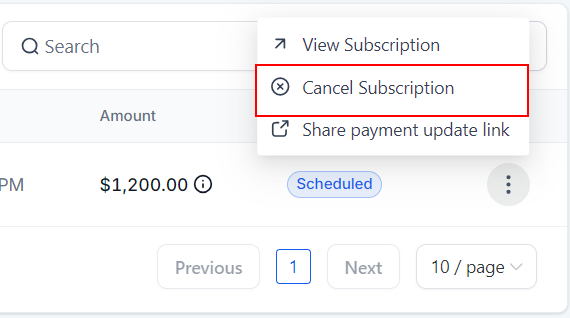
- Subscriptions created using NMI/Authorize.net can be canceled within the Subscriptions page using the ‘Cancel Subscription’ action.
- We do not create subscriptions using the Automatic Recurring Billing of NMI/Authorize.net; hence, only charges corresponding to a subscription transaction will be visible in the merchant portal.
Q: Will I be able to refund transactions as well within the application itself?
- No, as of now, we do not have the refund functionality within the application. It would be best if you used the merchant portal for refunding transactions for now.
Q: Where will I be able to find the subscriptions created via NMI? I cannot relate to the subscription status defined on the Subscriptions page.
All subscriptions created on the order forms can be tracked under Payments ➝ Subscriptions. The following represents subscription statuses and their inferences:
- Pending - When the first transaction for the subscription could not be completed, or the transaction is held for review
- Trial - Subscription is in trial mode
- Active - The last payment was made, and there is an upcoming payment as well
- Expired - All the subscription payments have been completed, and the subscription no longer exists
- Canceled - The business canceled the subscription using the Cancel action, and no further payments will be processed.
- Unpaid - The last payment for the subscription was not paid successfully. The subscription is ongoing, but the final payment was unsuccessful.
The following actions will be provided for the subscriptions according to the status:
Q: When will the NMI integration be available for Calendar payments/memberships and other areas?
- NMI integration will be available for calendar payments by the end of Q1’23. Other areas like memberships, and SaaS will continue to process payments via Stripe.
The following flow describes the handling of subscription statuses and payment retry logics in case of a subsequent payment failure:
- If the first subscription payment is successful while purchasing the subscription on the order form, the subscription will move into the active state. It can also move into the trial status if a trial period is attached to the recurring product. The subscription will remain active until every recurring payment is made successfully for the subscription and will move to “Expired” after the completion of payments.
- The payment will be attempted two more times after 24 hrs each. The status will remain “Unpaid.”
- The subscription will remain in the Unpaid state and attempt the following subsequent transactions, each with two retries. The next subsequent payment will also be attempted, and if any payment becomes successful, the subscription will move into “Active.” Else will stay with “Unpaid” status.
- The subscription status will move to “Expired” after all the retries are made for the last transaction.
- If the business disconnected the gateway account and there is an ongoing subscription, the transaction cannot be processed, and hence the subscription will move to unpaid. The retry attempts will continue according to the retry logic.
Not a Funnelbud customer yet?
Try our all-in-one CRM for sales and marketing — free for 7 days, no commitment.