Email Services Configuration - How to set up my "reply-to" & Forward Settings
Reply Address
FunnelBud Flow allows you to add Reply-To addresses to your emails, but it’s important to note the Reply-To address must be set within the message before your application sends the email to FunnelBud Flow for processing and delivery.
Regardless of whether you are using a sub(domain), your replies will be tracked under conversations. Nonetheless, you might have reasons for needing any replies to return to a specific personal address (like a marketing@outlook.com address) rather than the address listed in the From field.
However, please note that if you are using subdomain like m**k.funnelbud.com, by default ReplyTo field will show your name@m**k.funnelbud.com.
All incoming emails will be sent to that email address instead of routing to the Conversation tab. When you reply to the leads’ email in your inbox outside the CRM, your reply will not sync back to the CRM.
How to set up a reply-to-address
- Go To Settings—> Email Services
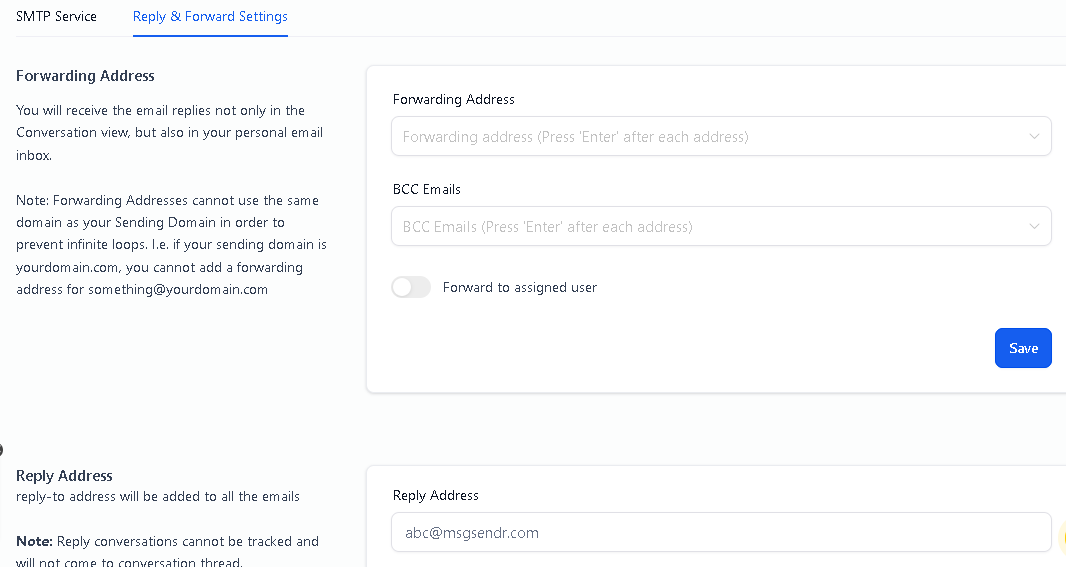
- Switch to tab Reply & Forward Settings
- Scroll down to reply to the section and add your preferred email address.
Note:
**reply-to address will be added to all the emails
**Reply conversations cannot be tracked and will not come to conversation thread
Apply Reply-To Address to my old newsletters
- Reply-To settings are by default will be applicable to new contacts
- If you need to send an old newsletter, just clone it and sent it out.
BCC Emails
You will receive a Blind Carbon Copy of every email that goes out from that location. This is configurable from Settings> Email Services> Reply & Forward Settings> BCC Emails
Forwarding Address
If a lead responds to an email, that response is always going to show up in Conversations tab, however, if you want a COPY of the lead’s email response to go to someone’ email, you could put in that email address there.
Forward to assigned user
The assigned user of the lead will receive the email replies in their Email Inbox. The Email will be sent to the Email address for that user in Settings> My Staff> edit User> User Info.
Please Note:
- You could enter multiple forwarding email addresses here separated by a comma, e.g. email1@test.com, email2@test.com, email3@test.com.
- Forwarding address and BCC Emails work only on Mailgun and Flow email, we don’t support other smtp providers
FAQs:
1. Why the attached files do not get forwarded along with the email replies?
The forward settings in the email services tab do not support forwarding attachments. So if the contact replies to the emails with an attachment, we will need to log in to the FunnelBud conversation view to see it.
Not a Funnelbud customer yet?
Try our all-in-one CRM for sales and marketing — free for 7 days, no commitment.