Managing and Deleting Twilio Numbers
Whether it be because you’re not using it or you want to change the number you have, there might come a time when you need to remove a Phone Number from your account. This guide will help you achieve that goal. To begin, navigate to the bottom left of your CRM dashboard and click “Settings”. In there, select “Phone Numbers” to view your Twilio numbers.
Deleting a Twilio Number
Once you’re in the “Phone Numbers” section, you’ll notice each number has a corresponding trash icon. Click the three dots button next to the number you wish to remove.
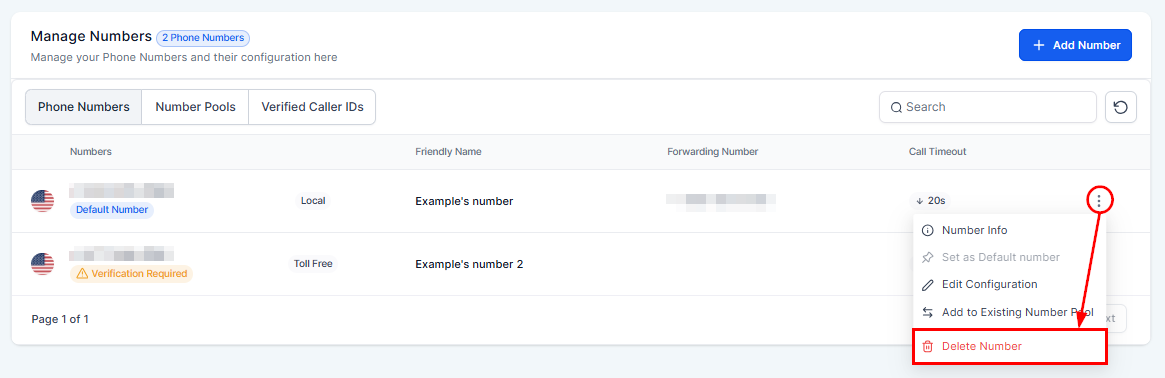
A confirmation prompt will appear, asking you to type “delete” to confirm the action. This icon is used to remove a Twilio number from your account.
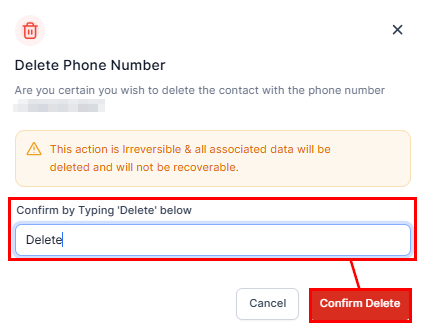
Releasing a Twilio number means it is removed from your account and made available for others to purchase. However, it’s important to note:
- Once released, the number will move to the “Released Phone Numbers” section on your Twilio console page.
- If you change your mind, you can repurchase the number, provided it hasn’t been purchased by someone else.
- If it’s been more than 10 days since the release, you may need to contact Twilio support to retrieve the number.
Frequently Asked Questions
Q: What happens if I accidentally release my number?
- If the number is still available, you can buy it back from the “Released Phone Numbers” section. If it’s been more than 10 days, contact support for assistance.
Not a Funnelbud customer yet?
Try our all-in-one CRM for sales and marketing — free for 7 days, no commitment.