How to Add WhatsApp Media to Documents
WhatsApp conversations often include more than just messages. Customers regularly share photos, videos, PDFs, and documents that are critical to sales, support, and ongoing relationships. Until recently, these files would disappear automatically due to WhatsApp’s built-in expiration limits. Now, WhatsApp media inside your CRM is reliable, long-lasting, and easy to manage. Important files are securely stored and can live alongside your customer records—so nothing slips through the cracks.
Important Notes
- WhatsApp media is automatically retained for 1 year
- You can manually save WhatsApp files to a contact’s Documents folder
Let’s break these down in simple terms.
WhatsApp Media Is Retained for 1 Year
All WhatsApp media is automatically stored in the CRM for up to one full year—no setup required.
This includes:
- Inbound media: Files customers send to your business, such as photos, videos, PDFs, and documents.
- Outbound media: Files your business sends to customers, such as invoices, proposals, brochures, and images.
Once the file comes through WhatsApp, it’s securely saved in your CRM before WhatsApp removes access to it.
Why This Matters
WhatsApp places strict limits on how long media files remain available:
- Inbound media expires after 7 days.
- Outbound media expires after 30 days.
Once these limits are reached, the files cannot be recovered. This often leads to missing documents, broken conversation history, and unnecessary frustration.
Your CRM stores WhatsApp media before it expires on WhatsApp, allowing you to access it for a full year—even after WhatsApp removes it.
“Add to Documents” for WhatsApp Media
In addition to automatic storage, you have more control over important files.
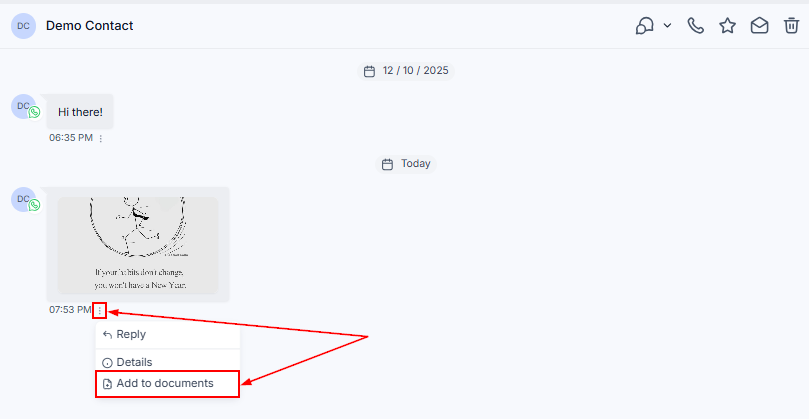
You can save WhatsApp attachments directly to a contact’s Documents folder using the “Add to Documents” option.
This works for both inbound and outbound WhatsApp media.
How It Works
Click on any WhatsApp media attachment in the conversation, then select Add to Documents from the actions dropdown.
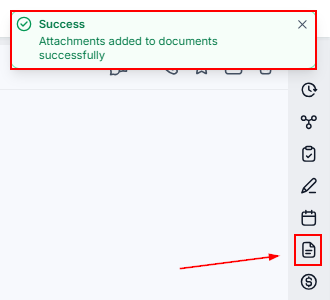
The file is instantly saved to the contact’s Documents section. Let’s click that tab.
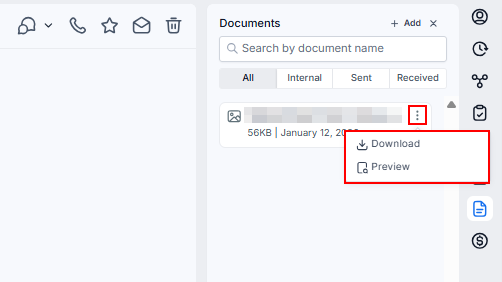
Select the three dots next to the file name to download or preview it.
If you’ve used attachments with Email or SMS before, this will feel familiar. The experience is intentionally consistent across channels.
With automatic 1-year media retention and the ability to save files directly to Documents, WhatsApp conversations are just as dependable as email. Your team can work with confidence, knowing that important files are preserved, organized, and always accessible when you need them.
Not a Funnelbud customer yet?
Try our all-in-one CRM for sales and marketing — free for 7 days, no commitment.