How to Enable Call Transcriptions
The Call Transcriptions feature allows users to maintain accurate records of all conversations, significantly aiding in documentation and compliance requirements. When enabled, transcriptions will be automatically generated for all outbound and inbound recorded calls, saving you time and effort, and seamlessly integrated into the conversation page, providing easy access and reference to call content.
Benefits of Call Transcriptions
- Efficient Documentation: Automatic transcriptions allow you to keep precise records of all conversations effortlessly, enhancing both documentation and compliance.
- Convenient Review: Review call content quickly without having to listen to full recordings, increasing both accessibility and efficiency.
How It Works
To enable call transcription, follow these steps:
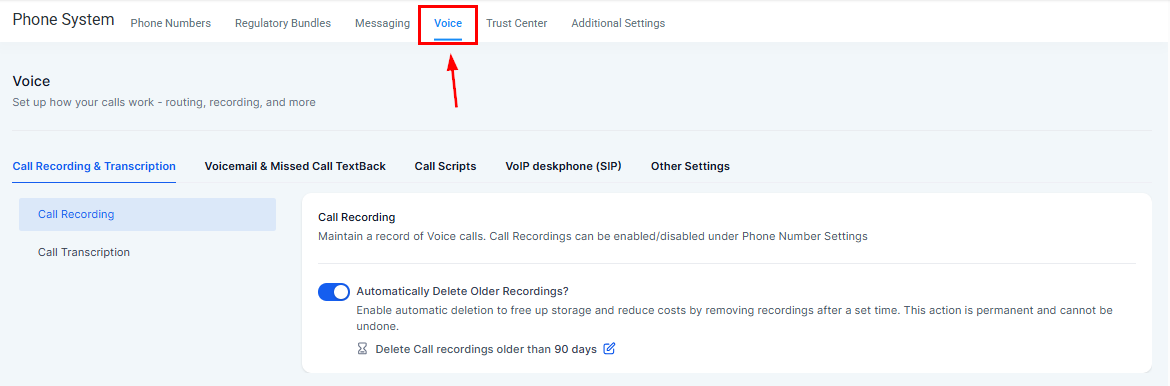
Navigate to the Phone Numbers section inside your settings and switch to the Voice tab.
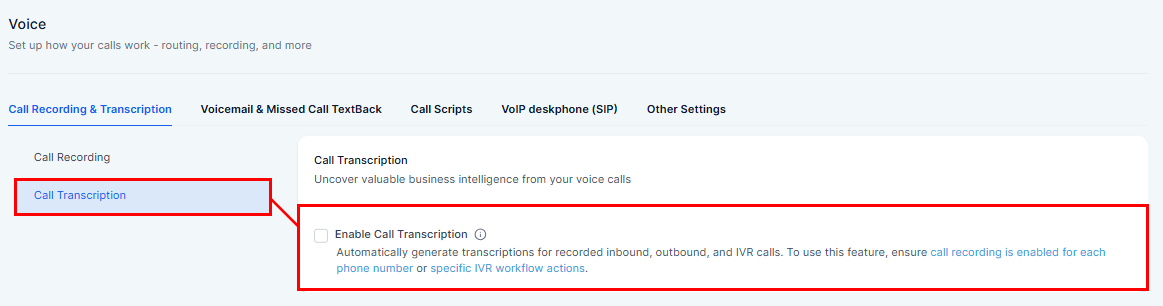
Enable Call Transcription from the Call Transcription view.
Accessing Transcriptions
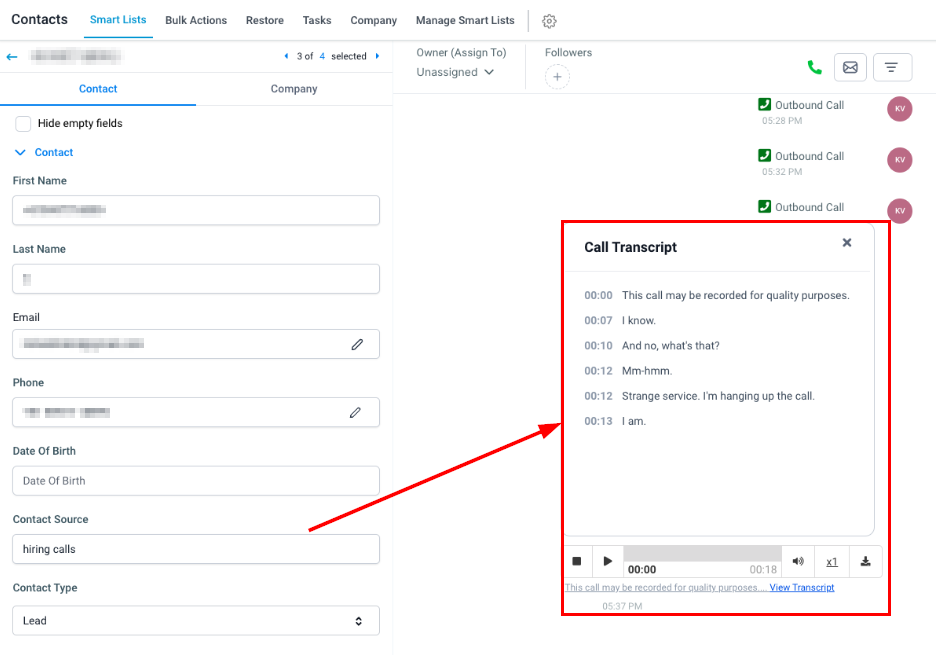
Once enabled, you can access the transcripts for recorded inbound and outbound calls by selecting the contact card within the Conversations or Contacts tab.
📌Note: Call transcription is not supported for IVR-recorded calls and is only available for the phone number with call recording enabled.
By utilizing call transcriptions, you can significantly enhance your documentation processes, improve compliance, and streamline the review of recorded calls.
Frequently Asked Questions
Q: What are call transcriptions and how do they work?
- Call transcriptions are automatically generated text records of your recorded calls. They are created for all outbound and inbound recorded calls, making it easier to document and review conversations.
Q: How can I enable call transcription?
- Enable call transcription by navigating to Settings > Voice > Call Recording & Transcription > Call Transcription, and then enabling the Call Transcription option.
Q: Where can I find the call transcriptions once enabled?
- Transcriptions will be seamlessly integrated into the conversation page, providing easy access and reference to call content.
Q: How will call transcriptions help my organization?
- Call transcriptions improve documentation and compliance by providing accurate records of conversations. They also enhance accessibility and efficiency by allowing easy review of call content without listening to the entire recording.
Troubleshooting Tips
Issue: Call transcriptions do not appear on the conversation page.
- Ensure that call transcription is enabled in the phone settings under the voice tab.
Issue: Transcriptions are not accurate or incomplete.
- Check the quality of the recorded calls. Background noise and poor audio quality can affect transcription accuracy.
Not a Funnelbud customer yet?
Try our all-in-one CRM for sales and marketing — free for 7 days, no commitment.