Monday.com Actions & Triggers
Modern teams move fast. Projects evolve, statuses shift, new tasks appear, and updates happen constantly. When your project management system operates in isolation from your CRM, coordination becomes manual—and costly.
The Monday.com integration eliminates that friction. It enables real-time automation between your boards and your broader workflow ecosystem—syncing tasks, statuses, updates, and users instantly. The result is tighter alignment, reduced manual effort, and faster execution across teams.
Why This Integration Matters
With this integration, you can:
- React instantly to board, item, and status changes
- Keep CRM, communication, and reporting tools synchronized
- Reduce manual coordination between departments
Instead of copying updates across systems, your workflows respond automatically to project activity.
Triggers: From Boards to Automated Workflows
Triggers allow events inside Monday.com to initiate automation immediately.
Triggers (Coming Soon)
- Any Column Value Changed in Board: Fires when a specific column—such as status, date, owner, or custom field—is updated.
- Any Item Moved to a Group: Activates when an item shifts between board groups.
- New Board: Runs when a new board is created.
- New Item in a Board: Triggers whenever a new item is added.
- New Subitem in Board: Fires when a subitem is created under a parent item.
- New Update in Board: Activates when a comment or update is added to an item.
- New User: Triggers when a new workspace user is added.
These event-based triggers are designed for near real-time automation, enabling instant responses to project activity.
Actions: Automate Changes Back into Monday
Workflows don’t just react—they can also modify and manage boards dynamically.
Available Actions
- Create New Board / Group / Column / Item / Subitem: Build new structures directly from a workflow.
- Update Item / Update Subitem: Modify status, due dates, owners, or custom columns.
- Archive Board / Archive Group: Automatically archive boards or groups.
- Delete Item / Delete Group: Remove outdated structures.
- Get Board Items: Retrieve all items for syncing or reporting.
- Find Items by Column Value: Search items dynamically using status, owner, or custom fields.
- Find Items by ID: Locate a specific item using its unique ID.
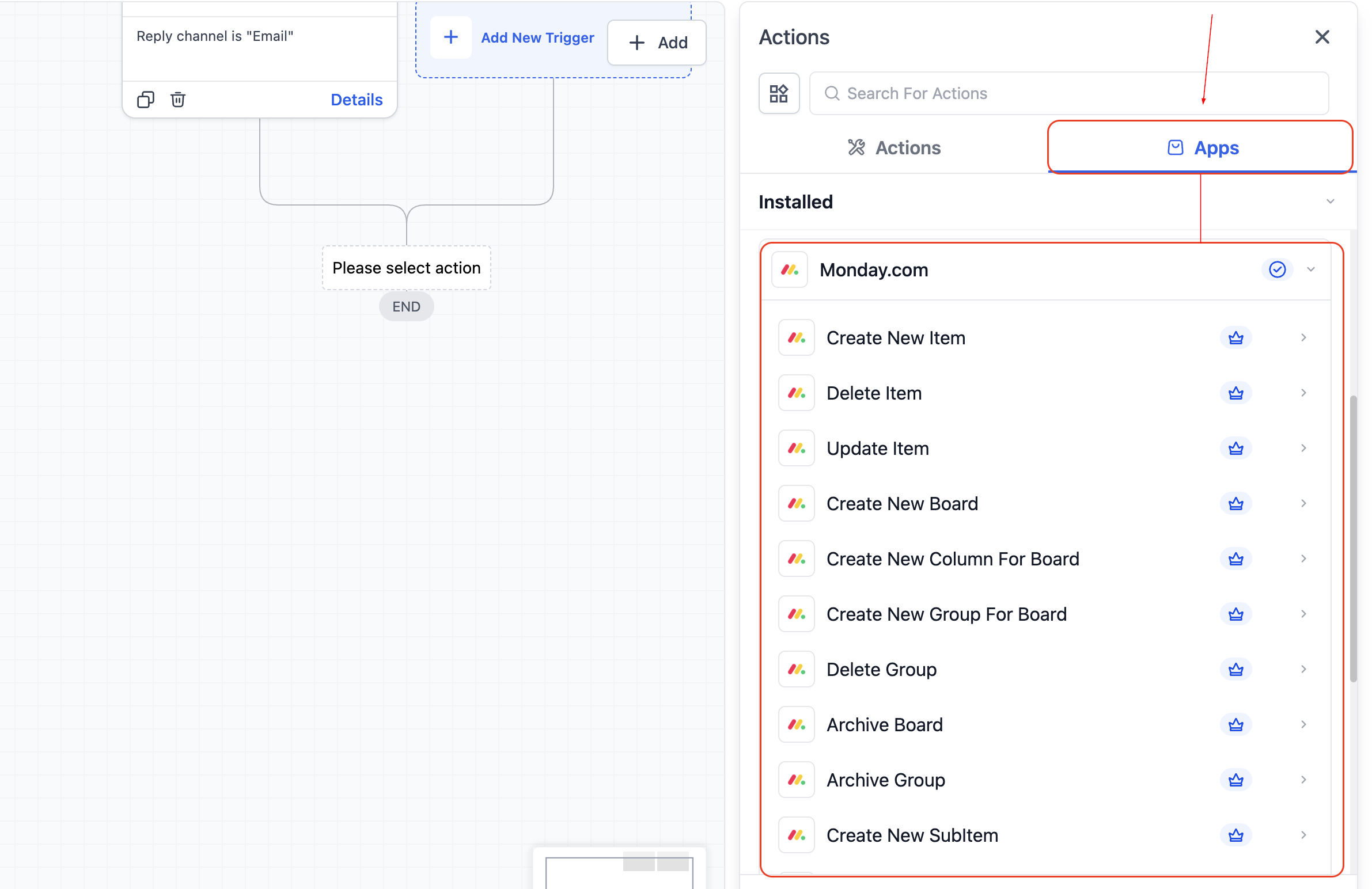
These actions allow workflows to maintain structural integrity across systems without manual intervention.
How It Works
To get started, locate Monday.com inside the Automation Builder by clicking Add Trigger or Add Action and searching for Monday.com.
Once selected, connect your account by authorizing your workspace with your Monday.com API key.
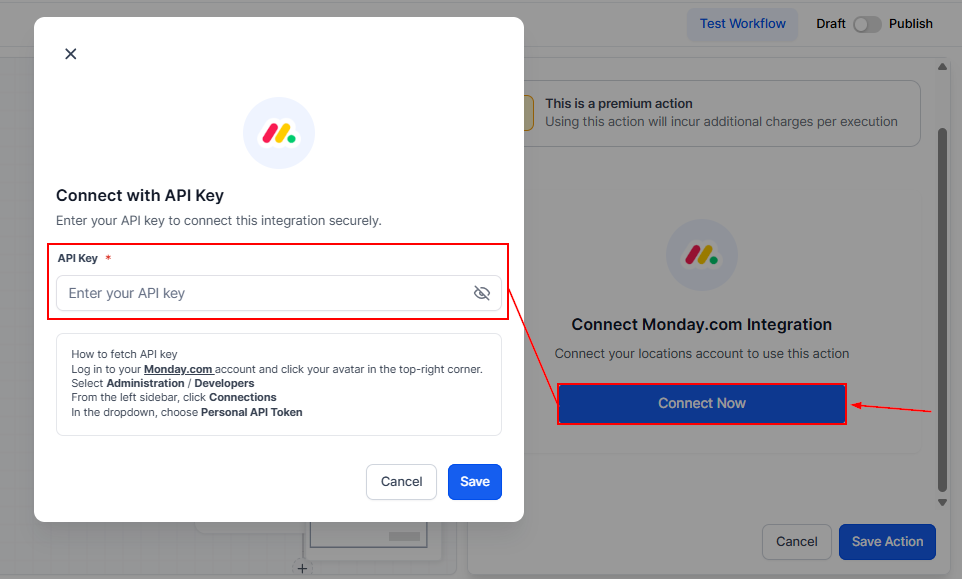
After authentication, configure your trigger or action by choosing the appropriate board, group, or column, then run a test to retrieve sample data and verify that all fields are mapped correctly before activating the workflow.
Practical Use Cases
Client Onboarding Automation
- Goal: Sync new onboarding items with CRM and notify internal teams.
- Trigger: New Item in Board (“Client Onboarding”)
- Actions: Create or update CRM contact, Send Slack message to the account manager, Log tracking entry in Google Sheets, and Update Monday item status to “CRM Synced”.
- Outcome: Every new onboarding item immediately updates CRM records and alerts the team.
Project Completion → Client Communication
- Goal: Notify clients when a project reaches completion.
- Trigger: Column Value Changed (Status → Completed)
- Actions: Send Gmail message to the client, Create a CRM note, Archive the item, and Send Slack update to #client-updates
- Outcome: Clients receive timely updates, and internal teams maintain visibility automatically.
Internal Task Sync Across Platforms
- Goal: Keep design or production tasks aligned between tools.
- Trigger: New Item in Board (“Design Tasks”)
- Actions: Create a task in ClickUp, Store Monday item ID in a custom field, Send Slack notification, and Update Monday item with the external task link
- Outcome: Teams operate in their preferred platforms while preserving cross-system visibility.
By integrating Monday.com with your automation, you transform board activity into actionable workflows. Status changes trigger communication, new tasks update CRM records, and project milestones drive reporting and client notifications.
Instead of chasing updates across tools, your systems stay synchronized automatically—allowing your team to focus on execution rather than coordination.
Frequently Asked Questions
Is this a two-way sync?
- Workflows execute in one direction per trigger: Monday → Workflow → Actions.
Do I need a paid Monday.com plan?
- Most features work on free and paid plans, though advanced board capabilities may require a paid tier.
Can I update multiple columns at once?
- Yes. Update Item and Update Subitem actions support multiple column mappings in a single execution.
Not a Funnelbud customer yet?
Try our all-in-one CRM for sales and marketing — free for 7 days, no commitment.